Thursday, January 29, 2009

How to turn off the new forum text editor...

We finally got the bugs worked out of the new text editor for the photo.net forums. Personally, I think the new editor, while not perfect, is a lot better than what we had before. There is no reason that people should have to learn circa 1999 HTML to make a forum post in 2009.

However, I realize that some of our users would prefer to go back to the older non-WYSIWYG system. Thanks to our crack team of programmers, that is now possible.
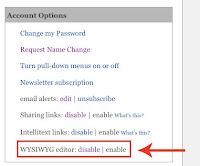
  • Go to your "My Workspace" area (link in the upper right corner of every page).
  • Under "Account Options" look for "WYSIWYG editor: disable - enable".
  • Click on "disable".
  • Enjoy your new WYSIWYG-free existence.

Labels: ,

Wednesday, November 21, 2007

Changes to photo.net homepage

We made a few adjustments to the photo.net homepage to make it easier to read. It was getting a bit cluttered. But that's what happens when you have a site with as much information as this one.

The changes are slight enough that most users wouldn't even have noticed if it wasn't pointed out to them. But since I am pointing it out anyway, here's a comparison:

Labels:

Wednesday, November 14, 2007

A few small site changes

We made a few small changes this week that will help with site functionality. Nothing huge, but some "my workspace" changes and some changes to the navigation bar that is at the top of every photo.net page. The navigation bar changes will probably be the most useful on a day to day basis for users. But the "my workspace" cleanup is nice as well.

In the "My Workspace" area (http://photo.net/pvt/home)
  • Clarified wording, consolidated links, and cleaned up the layout
  • Added direct links to popular features (image reordering, folder access, etc)
  • Added images (self portrait & images from portfolio)

Navigation Bar changes
  • Updated section naming to be more straightforward (Gallery, Equipment, etc)
  • Added a "Community" section with a number of links & the new blog
  • Updated the navigation options based on user data to reflect new content and highlight the site's most popular sections/pages
  • Most every forum is not listed in the "forums" drop down menu

Portfolio Management page - (http://photo.net/photodb)
  • Added direct links to image re-order page for each folder
  • Re-organized items on page
  • Added in sample images

Labels:

Friday, October 12, 2007

Forum post history now newest to oldest

Photo.net member Craig Gillette made a very good point in this thread about how user forum histories are displayed when all are listed (example).

At some point in the beginning days of photo.net the decision was made to display user forum post history with the oldest posts at the top and the newest at the bottom. That was fine for a while, but now almost a decade later, many of us have thousands of posts to look through. So it makes more sense to have the newest posts on the top. Thanks to Craig's suggestion and our programmer's quick work, that is how they will be displayed from now on.

Labels: ,